Your employment
First steps towards your first employment with Smart
- Deadlines
- Employment conditions
- Managing your employment
- Submit an employment request in the Smart Portal
- View your employment and find documents
- Requesting changes
- Ending your employment
- Employment categories
Deadlines
Here you can find all deadlines and dates relevant to your employment.
| Request new employment / changes to employment | by the 10th of the current month |
| Register for / cancel the Jobticket | by the 6th of the previous month |
| Register for Urban Sports Club | by the 15th of the current month |
| Salary payment | on the 28th of the current month |
| Submit expense reimbursements and travel expenses from the previous year | by the end of February of the current year |
| Termination of the employment contract | two weeks before the end of employment ** |
* If you want to start during the current month, no reimbursement for part of the month is possible. More information can be found under Urban Sports Club.
** Please let us know as soon as possible if you want to end your employment and would also like to have your remaining budget paid out. In this case, we may need more time to discuss your situation and make the necessary calculations.
Employment conditions
You will receive an employment contract for a job at Smart. The prerequisites for this are membership of the cooperative and orders that cover your employment costs. Of course, formal employment law conditions must also be met.
Your membership of Smart does not mean that you are automatically employed by Smart. You must actively inform Smart of your employment request and submit orders. Your employment is only confirmed once you have received the employment contract from us by e-mail.
Requirements for employment
- Ordinary residence in Germany
- You must have orders that can be invoiced by Smart and that cover your employment costs.
- For employment subject to social security contributions, your income must be at least €860 net on average per month.
- The standard duration of a first employment contract is four months.
- To be covered by health insurance through employment with Smart, the income from employment with Smart must make up the majority of your total income (if you are self-employed at the same time). Your employee's gross salary should be higher than your profit as a freelancer.
- Non-EU nationals must have a valid residence permit that allows employment (gainful employment).
Deadline
Any request regarding an employment contract must be communicated to us by the 10th of the month. For example, if you want be employed in February, you must let us know by February 10th.
Are you interested in a mini-job? Please read more here.
Managing your employment
Submit an employment request in the Smart Portal
You'd like to be employed by Smart and you already have orders? Then go ahead and submit a new employment request in the Smart Portal.
Do you already have a contract with Smart and want to prolong it or make a change? Then read further how to request a change.
1) Select the budget for your employment. Here you can choose between the Smart eG and the Smart Bildungswerk, depending on the acitivities you are processing.
Please note that your employment request can only be confirmed if you have sufficient available budget to cover the employment costs for your first month of employment. Your available budget consists of confirmed order forms and paid invoices.
Smart eG and Smart Bildungswerk are two separate legal entities. Orders processed via one entitity can only be used to be employed by that company. If you process some orders via Smart eG and other via Smart Bildungswerk, you can request two separate employment contracts to pay out your budget.
2) Choose the start and end date of your employment.
3) Describe the job title as it should appear in your employment contract.
4) Choose a service category that comes closest to your profession.
5) Choose an employment category. Here you can see the name of the employment category and the total employment costs per month.
6) The working hours per week is a maximum value to guarantee the minimum wage. Make sure that you do not exceed the weekly number of hours. If your working hours per week differ, you can enter this in the comments.
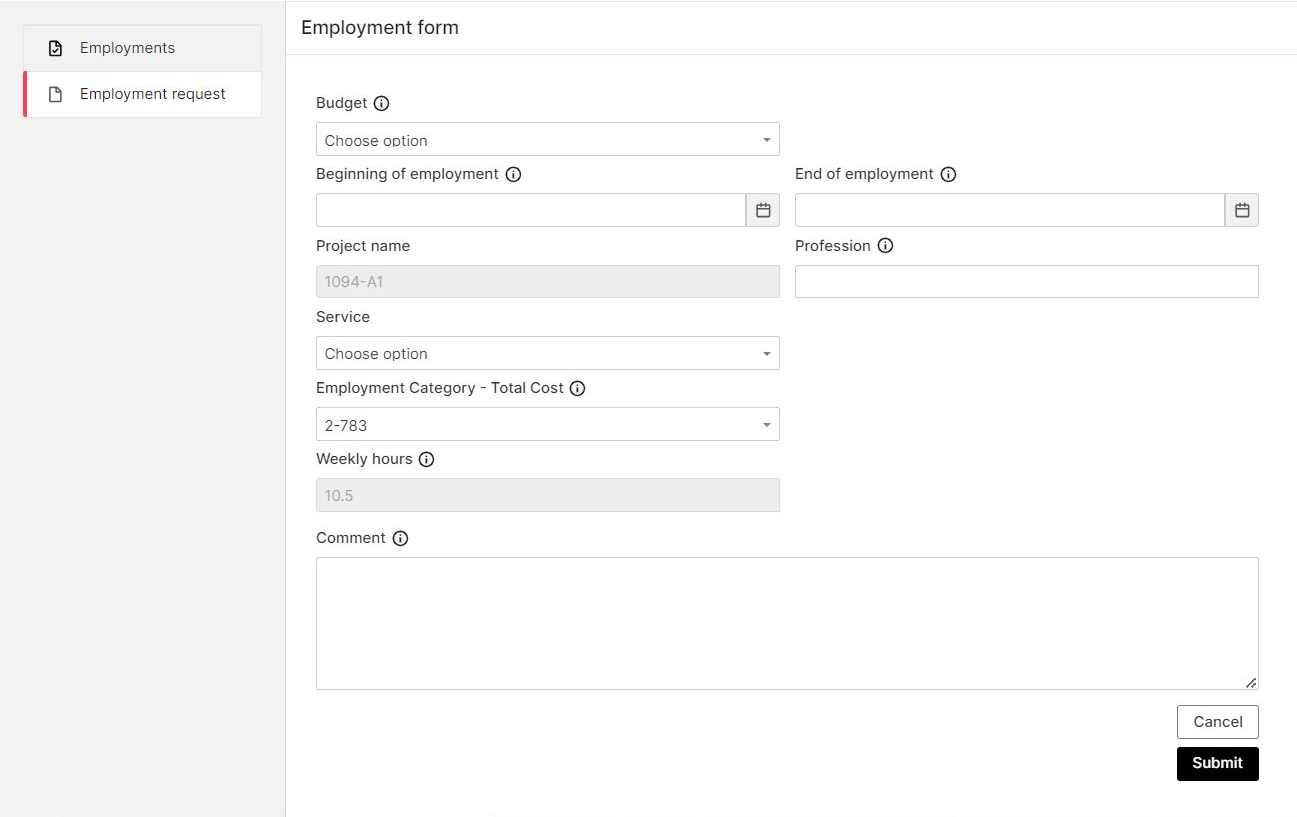
Send your employment request. You will receive a notification by e-mail as soon as we have processed your request.
View your employment and find documents
List of employments
In the list of employments you will see all your current and past employment contracts with Smart. Please note that cancelled employment request are also listed.
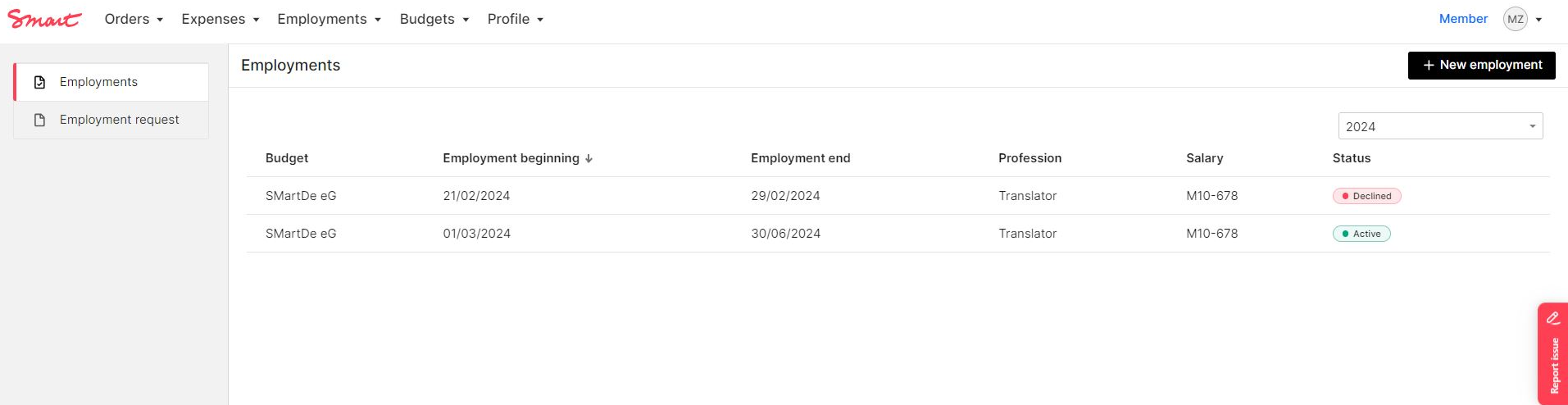
View of employment and documents
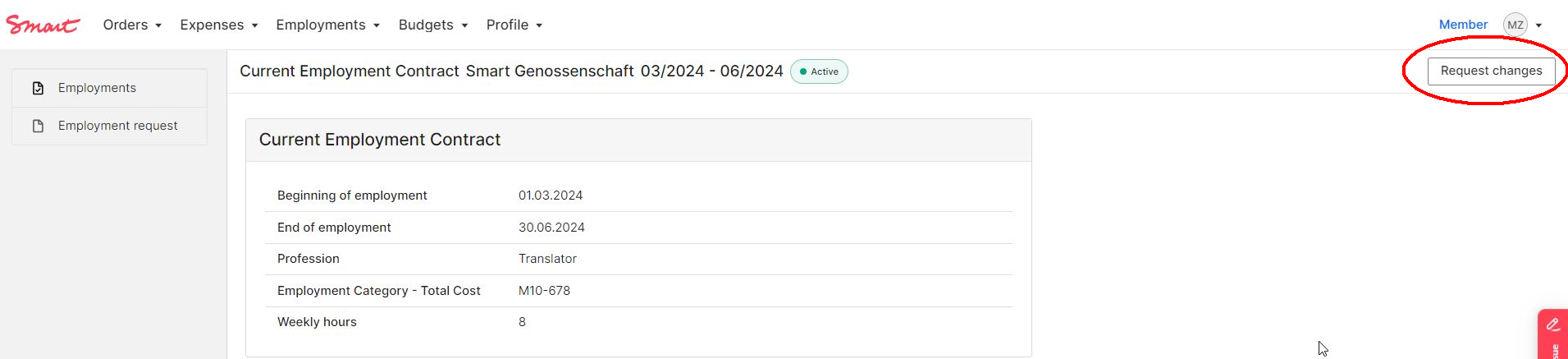
The details of an employment period can be opened by double clicking on the relevant line in the employment list. The overview shows the start and end date of the employment, the employment category, the profession as given in the contract and the weekly working hours.
Your current contract and contract changes related to this employment can be found under Documents. Please choose the correct category from the drop-down list.
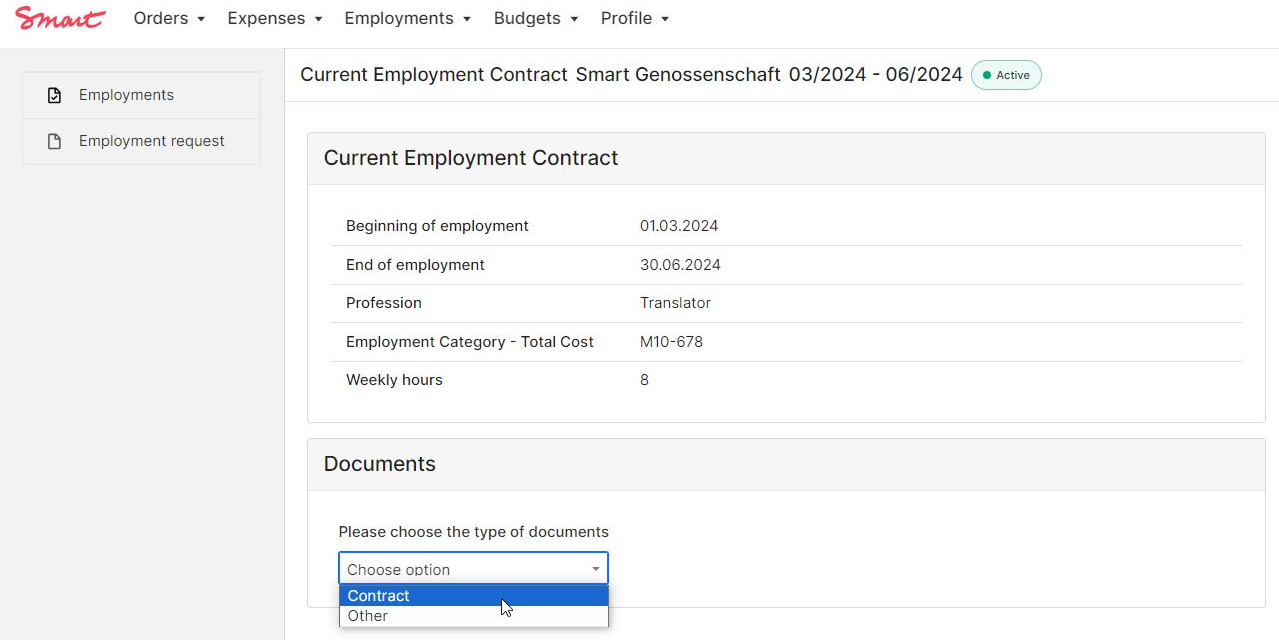
If you have several employments at Smart (e.g. at Smart eG and Smart Bildungswerk, or if you had a longer break between two jobs, you will find the relevant documents in the respective contract period in the list)
Employment contract
- after you sign your employment contract it will appear here
For legal reasons the employment contract is only available in German.
Addendum
- Amendments to the employment contract
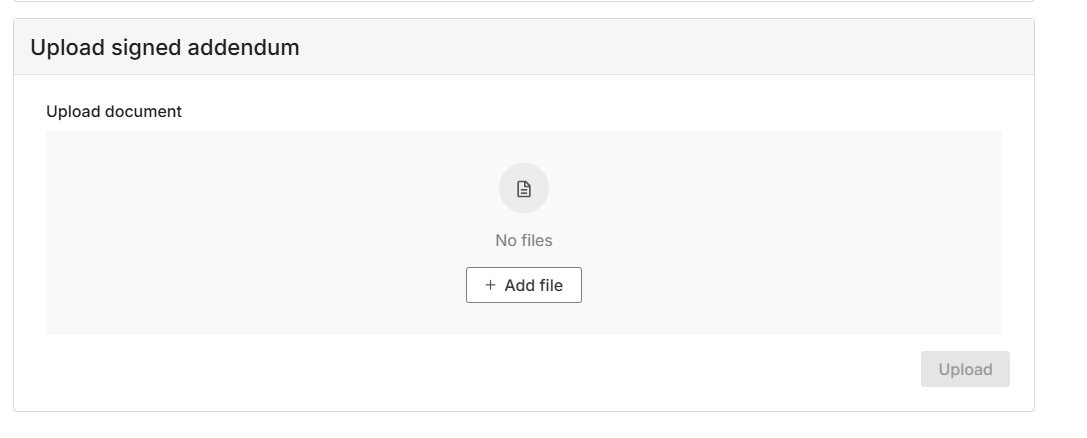
After the Smart confirmation of your employment change, you can find and download your addendum in the portal:
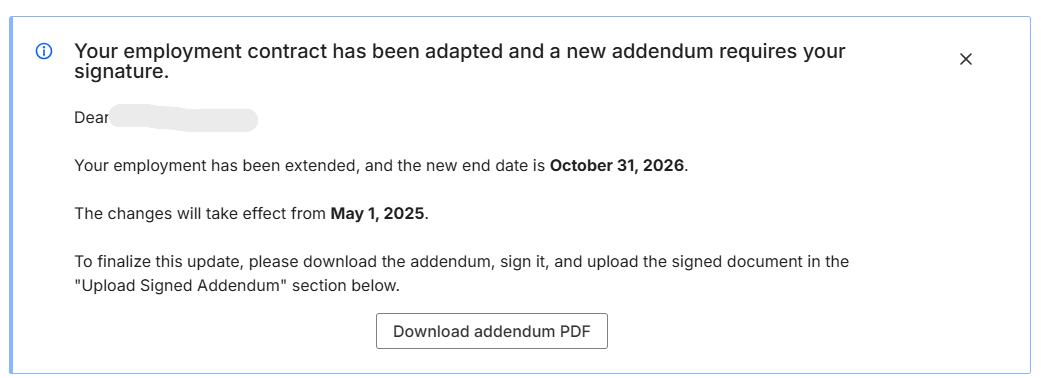
You can upload the signed contract directly in the portal:
Pay slips
- Monthly and yearly payslips as well as other documents related to the payroll are saved in your Mein Smart folder, not in the Portal.
- Additionally, your monthly payslip will be e-mailed to you at the end of each month of employment.
Payslips are official documents stating your income. Please find out more under Payroll.
Requesting changes
If you would like to make changes to your employment contract, you can do so by clicking on the "Request change" button in the employment detail view.
Click the checkmark in front of the respective change type to enter the desired data. Finally, you must send the form to the Smart Team by clicking the "Send" button. If the change is approved, you will receive your contract change ("Addendum") per e-mail. You'll also find the contract change in your Documents. You can view the adjusted changes in your budget overview immediately after confirmation.
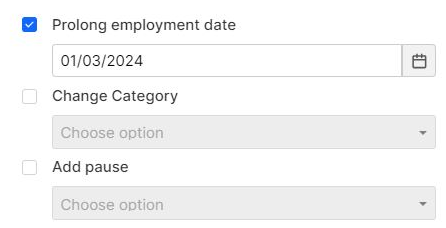
You can make following requests:
Prolong employment contract or change end date
Choose the new end date and you will receive an addendum to your contract after confirmation by Smart.
Please always prolong your contract via the Portal BEFORE it's end date.
Change salary / employment category
Once you have selected the category, please indicate in the comment field from which date the change should take effect. Please note that changes for the current month must be submitted by the 10th of the month at the latest.
You can find the employment categories here: Employment categories
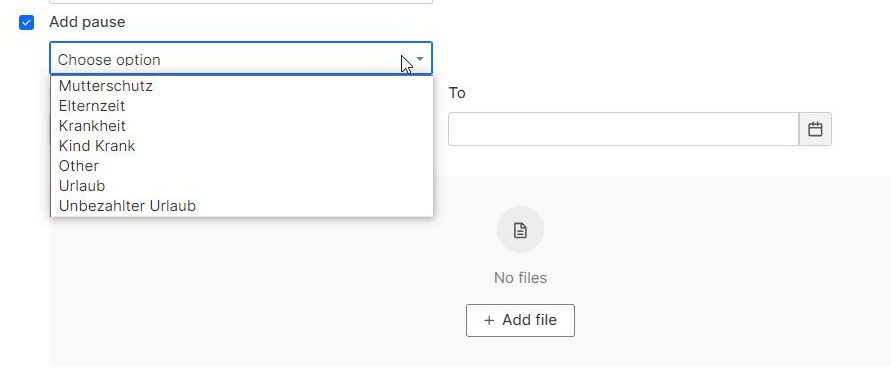
Register a leave
If you're planning a longer leave, please let us know. Details regarding the different types of leave can be found here.
Add special payment
The special payment will be included in your next payroll, provided there is enough budget available. Special payments can include (partial) reimbursement for a Jobticket or Urban Sports Club membership, as well as overtime.
Overtime is treated like regular salary, so social security contributions and taxes will be deducted according to your employment category.
If you want to receive a bonus with your salary, select “Other”. Under “Amount”, enter the total amount you want to use from your budget. This amount will be added to your employment costs for the month. As social security contributions and taxes will be deducted, the resulting net salary will be lower than the amount entered.
If you're adding a Jobticket or USC Membership, please let us know in the comment section when it's starting. Also, don't forget to actively request the Jobticket and USC Membership (details about how do that are right here).

Request adaptation to a previous month
Did something go wrong in the past month? Maybe you selected the wrong category or were on sick leave but forgot to mention it? Let us know!
Ending your employment
If you want to terminate your contract (for example, because there is no budget or you have another job), a formal notice of termination with the following details is required:
- Date of the letter (at least two weeks before the end of the desired contract end date)
- Sentence "I hereby terminate my employment contract with effect from" (date: the last day of the last month of employment)
- Your registration address, first and last name and membership number
- Address of the cooperative: SMartDe eG or Smart Bildungswerk gGmbH, Wilhelmstraße 150, 10963 Berlin
- Signature (digital or original)
The original signed notice of termination should be sent by e-mail. The date of termination must be before the desired termination date.
Example: The employment contract runs until March 31. The employment contract is to be terminated on February 28th. The notice of termination must be submitted two weeks before February 28th. If your employment with Smart ends, you must ensure that you continue to have health insurance yourself. If you have any questions, you can of course contact us.
Don't have any new orders planned? Contact us, and we'll try to find an individual solution. For example, we could reduce your salary or offer you unpaid leave.
Do you still have any budget remaining after the payment of your last salary? Please let us know in good time if you would like to use your full remaining budget before the end of your employment.
Ending your employment contract does not mean terminating your membership with Smart. We recommend keeping your membership in the cooperative so that you have the flexibility to resume your employment when you need to.
Employment categories
Employment categories Smart eG
Here you will find the salary categories that can be selected for the employment contract with Smart eG. If you are employed by Smart Bildungswerk, please refer to the employment categories of Smart Bildungswerk.
*Important: All amounts in the table are rounded in € and refer to calculations based on the following: Year of validity 2026, tax class 1, without church tax, without child allowance, health insurance contribution 17,29% (Techniker Krankenkasse), pension insurance exemption for Minijob.
As your personal characteristics may differ from this calculation, the exact total cost of employment will be adjusted monthly in your budget. Minor differences are possible.
In the Smart Portal, you can select the employment category in the employment form. In the dropdown list you will be able to see the category number and the total employment costs including social security contributions and tax.
1. Employment categories with access to social security system
In the table below you can find further information on the gross wage that will be shown in your employment contract, projected net salary as well as the minimum turnover needed to finance the category.
|
Cat. |
Total employment costs incl. Taxes and contributions |
|
Gross Wage amount in your employment contract in € |
|
Net sum to be transferred to your bank account* in € |
|
Required monthly net turnover (Total employment costs + Smart Fee) in € |
|
1 |
776 |
|
605 |
|
601 |
|
852 |
|
2 |
788 |
|
615 |
|
608 |
|
866 |
|
3 |
877 |
|
690 |
|
660 |
|
964 |
|
4 |
966 |
|
765 |
|
712 |
|
1.062 |
|
5 |
1.061 |
|
845 |
|
768 |
|
1.166 |
|
6 |
1.150 |
|
920 |
|
819 |
|
1.264 |
|
7 |
1.245 |
|
1.000 |
|
875 |
|
1.368 |
|
8 |
1.334 |
|
1.075 |
|
927 |
|
1.466 |
|
9 |
1.424 |
|
1.150 |
|
979 |
|
1.565 |
|
10 |
1.516 |
|
1.228 |
|
1.033 |
|
1.666 |
|
11 |
1.608 |
|
1.305 |
|
1.086 |
|
1.767 |
|
12 |
1.697 |
|
1.380 |
|
1.138 |
|
1.865 |
|
13 |
1.792 |
|
1.460 |
|
1.189 |
|
1.969 |
|
14 |
1.881 |
|
1.535 |
|
1.231 |
|
2.067 |
|
15 |
1.975 |
|
1.615 |
|
1.277 |
|
2.170 |
|
16 |
2.065 |
|
1.690 |
|
1.317 |
|
2.269 |
|
17 |
2.154 |
|
1.765 |
|
1.357 |
|
2.367 |
|
18 |
2.249 |
|
1.845 |
|
1.400 |
|
2.471 |
|
19 |
2.338 |
|
1.920 |
|
1.438 |
|
2.569 |
|
20 |
2.427 |
|
1.995 |
|
1.475 |
|
2.667 |
|
21 |
2.524 |
|
2.075 |
|
1.522 |
|
2.774 |
|
22 |
2.616 |
|
2.150 |
|
1.566 |
|
2.875 |
|
23 |
2.707 |
|
2.225 |
|
1.610 |
|
2.975 |
|
24 |
2.804 |
|
2.305 |
|
1.657 |
|
3.081 |
|
25 |
3.035 |
|
2.495 |
|
1.767 |
|
3.335 |
|
26 |
3.266 |
|
2.685 |
|
1.877 |
|
3.589 |
|
27 |
3.504 |
|
2.880 |
|
1.988 |
|
3.851 |
|
28 |
3.735 |
|
3.070 |
|
2.096 |
|
4.104 |
|
29 |
3.954 |
|
3.250 |
|
2.197 |
|
4.345 |
|
30 |
4.203 |
|
3.455 |
|
2.310 |
|
4.619 |
|
31 |
4.671 |
|
3.840 |
|
2.521 |
|
5.133 |
|
32 |
4.866 |
|
4.000 |
|
2.608 |
|
5.347 |
|
33 |
5.170 |
|
4.250 |
|
2.742 |
|
5.681 |
|
34 |
5.474 |
|
4.500 |
|
2.874 |
|
6.015 |
|
35 |
5.626 |
|
4.625 |
|
2.939 |
|
6.182 |
|
36 |
5.778 |
|
4.750 |
|
3.004 |
|
6.349 |
| 37 |
6.082 |
|
5.000 |
|
3.133 |
|
6.684 |
|
38 |
6.484 |
|
5.330 |
|
3.300 |
|
7.125 |
|
39 |
6.603 |
|
5.428 |
|
3.350 |
|
7.256 |
|
40 |
6.980 |
|
5.738 |
|
3.504 |
|
7.670 |
|
41 |
7.146 |
|
5.880 |
|
3.578 |
|
7.853 |
|
42 |
7.279 |
|
6.000 |
|
3.645 |
|
8.000 |
|
43 |
7.648 |
|
6.332 |
|
3.827 |
|
8.404 |
|
44 |
8.032 |
|
6.677 |
|
4.013 |
|
8.826 |
|
45 |
8.151 |
|
6.784 |
|
4.069 |
|
8.957 |
|
46 |
8.391 |
|
7.000 |
|
4.183 |
|
9.221 |
|
47 |
8.653 |
|
7.236 |
|
4.305 |
|
9.509 |
|
48 |
8.947 |
|
7.500 |
|
4.440 |
|
9.832 |
|
49 |
9.174 |
|
7.703 |
|
4.544 |
|
10.081 |
|
50 |
9.333 |
|
7.847 |
|
4.611 |
|
10.256 |
|
51 |
9503 |
|
8.000 |
|
4.683 |
|
10.443 |
|
52 |
9.729 |
|
8.203 |
|
4.778 |
|
10.691 |
|
53 |
10.033 |
|
8.480 |
|
4.909 |
|
11.025 |
|
54 |
10.256 |
|
8.703 |
|
5.027 |
|
11.270 |
|
55 |
10.633 |
|
9.080 |
|
5.227 |
|
11.685 |
| 56 | 11.053 |
9.500 |
5.450 |
12.146 |
|||
| 57 |
11.553 |
10.000 |
5.715 |
12.696 |
|||
| 58 |
14.053 |
12.500 | 7.074 | 15.443 | |||
| 59 | 16.580 |
15.027 |
8.481 |
18.220 |
|||
| 60 | 21.553 |
20.000 |
11.251 |
23.685 |
|||
| 61 |
26.553 |
25.000 | 14.025 | 29.179 | |||
|
100 |
0 |
|
0 |
|
0 |
|
0 |
2. Mini-job categories (without access to social security insurances)
The calculations of the total costs are based on a mini-job that is exempt from pension insurance. If no exemption is desired, the net payment amount is reduced. You can find out more about exemption and mini-jobs here.
You can choose the mini-job category as well as set the pension insurance preference in the employment form.
|
Cat. |
Total employment costs incl. Taxes and contributions |
|
Gross Wage amount in your employment contract in € |
|
Netto- sum to be transferred to your bank account* in € |
|
Required monthly net turnover (Total employment costs + Smart Fee) in € |
|
M1 |
93 |
|
71 |
|
71 |
|
102 |
|
M2 |
131 |
|
100 |
|
100 |
|
144 |
|
M3 |
215 |
|
165 |
|
165 |
|
236 |
|
M4 |
280 |
|
215 |
|
215 |
|
308 |
|
M5 |
373 |
|
286 |
|
286 |
|
410 |
|
M6 |
467 |
|
358 |
|
358 |
|
513 |
|
M7 |
560 |
|
430 |
|
430 |
|
615 |
|
M8 |
587 |
|
450 |
|
450 |
|
645 |
|
M9 |
622 |
|
480 |
|
480 |
|
684 |
|
M10 |
678 |
|
520 |
|
520 |
|
745 |
|
M11 |
704 |
|
540 |
|
540 |
|
774 |
|
M12 |
757 |
|
580 |
|
580 |
|
832 |
|
M13 |
787 |
|
603 |
|
603 |
|
865 |
Employment categories Smart Bildungswerk
Here you will find the salary categories that can be selected for the employment contract with Smart Bildungswerk.
*Important: All amounts in the table are rounded in € and refer to calculations based on the following: Year of validity 2026, tax class 1, without church tax, without child allowance, health insurance contribution 17,29% (Techniker Krankenkasse), pension insurance exemption for Minijob.
As your personal characteristics may differ from this calculation, the exact total cost of employment will be adjusted monthly in your budget. Minor differences are possible.
In the Smart Portal, you can select the employment category in the employment form. In the dropdown list you will be able to see the category number and the total employment costs including social security contributions and tax.
1. Employment categories with access to social security system
In the table below you can find further information on the gross wage that will be shown in your employment contract, projected net salary as well as the minimum turnover needed to request the category.
|
Category |
Total employment costs incl. Taxes and contributions |
|
Gross Wage amount in your employment contract in € |
|
Net- sum transferred to your bank account* in € |
|
Required monthly net turnover (Total employment costs + Smart Fee) in € |
|
1 |
787 |
|
605 |
|
601 |
|
865 |
|
2 |
799 |
|
615 |
|
608 |
|
878 |
|
3 |
890 |
|
690 |
|
660 |
|
978 |
|
4 |
980 |
|
765 |
|
712 |
|
1.077 |
|
5 |
1.077 |
|
845 |
|
768 |
|
1.183 |
|
6 |
1.167 |
|
920 |
|
819 |
|
1.282 |
|
7 |
1.264 |
|
1.000 |
|
875 |
|
1.388 |
|
8 |
1.354 |
|
1.075 |
|
927 |
|
1.488 |
|
9 |
1.445 |
|
1.150 |
|
979 |
|
1.588 |
|
10 |
1.539 |
|
1.228 |
|
1.033 |
|
1.691 |
|
11 |
1.632 |
|
1.305 |
|
1.086 |
|
1.794 |
|
12 |
1.723 |
|
1.380 |
|
1.138 |
|
1.893 |
|
13 |
1.819 |
|
1.460 |
|
1.189 |
|
2.000 |
|
14 |
1.909 |
|
1.535 |
|
1.231 |
|
2.098 |
|
15 |
2.005 |
|
1.615 |
|
1.277 |
|
2.203 |
|
16 |
2.096 |
|
1.690 |
|
1.317 |
|
2.304 |
|
17 |
2.187 |
|
1.765 |
|
1.357 |
|
2.403 |
|
18 |
2.283 |
|
1.845 |
|
1.400 |
|
2.509 |
|
19 |
2.374 |
|
1.920 |
|
1.438 |
|
2.608 |
|
20 |
2.464 |
|
1.995 |
|
1.475 |
|
2.708 |
|
21 |
2.562 |
|
2.075 |
|
1.522 |
|
2.816 |
|
22 |
2.656 |
|
2.150 |
|
1.566 |
|
2.918 |
|
23 |
2.748 |
|
2.225 |
|
1.610 |
|
3.020 |
|
24 |
2.847 |
|
2.305 |
|
1.657 |
|
3.128 |
|
25 |
3.081 |
|
2.495 |
|
1.767 |
|
3.386 |
|
26 |
3.316 |
|
2.685 |
|
1.877 |
|
3.644 |
|
27 |
3.557 |
|
2.880 |
|
1.989 |
|
3.909 |
|
28 |
3.792 |
|
3.070 |
|
2.096 |
|
4.167 |
|
29 |
4.014 |
|
3.250 |
|
2.197 |
|
4.411 |
|
30 |
4.267 |
|
3.455 |
|
2.310 |
|
4.689 |
|
31 |
4.742 |
|
3.840 |
|
2.521 |
|
5.211 |
|
32 |
4.940 |
|
4.000 |
|
2.608 |
|
5.429 |
|
33 |
5.249 |
|
4.250 |
|
2.742 |
|
5.768 |
|
34 |
5.557 |
|
4.500 |
|
2.874 |
|
6.107 |
|
35 |
5.712 |
|
4.625 |
|
2.939 |
|
6.276 |
|
36 |
5.866 |
|
4.750 |
|
3.004 |
|
6.446 |
|
37 |
6.175 |
|
5.000 |
|
3.133 |
|
6.785 |
|
38 |
6.583 |
|
5.330 |
|
3.301 |
|
7.234 |
|
39 |
6.703 |
|
5.428 |
|
3.350 |
|
7.366 |
|
40 |
7.086 |
|
5.738 |
|
3.504 |
|
7.787 |
|
41 |
7.255 |
|
5.880 |
|
3.578 |
|
7.972 |
|
42 |
7.390 |
|
6.000 |
|
3.645 |
|
8.121 |
|
43 |
7.765 |
|
6.332 |
|
3.827 |
|
8.533 |
|
44 |
8.156 |
|
6.677 |
|
4.013 |
|
8.962 |
|
45 |
8.277 |
|
6.784 |
|
4.069 |
|
9.095 |
|
46 |
8.521 |
|
7.000 |
|
4.183 |
|
9.363 |
|
47 |
8.787 |
|
7.236 |
|
4.305 |
|
9.656 |
|
48 |
9.086 |
|
7.500 |
|
4.440 |
|
9.984 |
|
49 |
9.317 | 7.704 | 4.544 | 10.238 | |||
|
50 |
9.478 | 7.847 | 4.611 | 10.416 | |||
|
51 |
9.651 | 8.000 | 4.683 | 10.605 | |||
|
52 |
9.881 | 8.203 | 4.778 | 10.858 | |||
|
53 |
10.190 | 8.480 | 4.909 | 11.198 | |||
|
54 |
10.417 | 8.703 | 5.027 | 11.447 | |||
|
55 |
10.801 | 9.080 | 5.227 | 11.869 | |||
|
56 |
11.229 | 9.500 | 5.450 | 12.339 | |||
|
57 |
11.738 | 10.000 | 5.715 | 12.899 | |||
|
58 |
14.284 | 12.500 | 7.074 | 15.697 | |||
|
59 |
16.858 | 15.027 | 8.481 | 18.525 | |||
|
60 |
21.923 | 20.000 | 11.251 | 24.091 | |||
|
61 |
27.016 | 25.000 | 14.025 | 29.687 | |||
|
100 |
0 |
|
0 |
|
0 |
|
0 |
2. Minijob categories (without access to social security insurances)
The calculations of the total costs are based on a mini-job that is exempt from pension insurance. If no exemption is desired, the net payment amount is reduced. You can find out more about exemption and mini-jobs here.
You can choose the Minijob category as well as set the pension insurance preference in the employment form.
|
Category |
Total employment costs incl. Taxes and contributions BW |
|
Gross Wage amount in your employment contract in € |
|
Net- sum transferred to your bank account* in € |
|
Required monthly net turnover (Total employment costs + Smart Fee) in € |
|
M1 |
93 |
|
71 |
|
71 |
|
102 |
|
M2 |
131 |
|
100 |
|
100 |
|
144 |
|
M3 |
215 |
|
165 |
|
165 |
|
236 |
|
M4 |
280 |
|
215 |
|
215 |
|
308 |
|
M5 |
373 |
|
286 |
|
286 |
|
410 |
|
M6 |
467 |
|
358 |
|
358 |
|
513 |
|
M7 |
560 |
|
430 |
|
430 |
|
615 |
|
M8 |
587 |
|
450 |
|
450 |
|
645 |
|
M9 |
622 |
|
480 |
|
480 |
|
684 |
|
M10 |
685 |
|
520 |
|
520 |
|
745 |
|
M11 |
704 |
|
540 |
|
540 |
|
774 |
|
M12 |
760 |
|
580 |
|
580 |
|
835 |
|
M13 |
790 |
|
603 |
|
603 |
|
868 |
Social security contributions
When you are employed, social security contributions and wage tax are financed from your budget and paid to the relevant authorities by the cooperative. You are responsible for both the employer’s and the employee’s share.
You can freely decide how much income per month to allocate to an employment arrangement based on the employment categories.
| Public health insurance | 14.6% plus additional contribution |
| Long-term care insurance | 3.6 - 4.2%, with/ without child |
| Pension insurance | 18.6% |
| Unemployment insurance | 2.6% |
| Additional employer costs | contributions variable between 0.5% and 3.5% |
| Income tax | progressive, depending on income |
The basic tax-free allowance for income tax (Grundfreibetrag) changes every year and depends on your personal circumstances. Use the income tax calculator on the website of the Federal Ministry of Finance to calculate accurately how much income tax you may have to pay.
Gross, Net and Turnover
When you are employed as a member at Smart, you encounter different figures: net salary, gross salary, employer gross, and turnover.
Net turnover: This is the amount Smart invoices to your clients. From this amount, the 9% Smart fee is also deducted. What remains goes into your budget.
Employer gross (total employment costs): Also called employment costs or total costs. This is the total amount needed to finance your employment for one month in your chosen category. This amount includes your net salary, social security contributions, and income tax.
From the employer gross, a first part of the social security contributions is deducted, resulting in the gross salary.
Gross salary (employee gross): This is the amount stated in your employment contract. It is calculated as the employer gross minus a portion of the social security contributions (at least half).
From the gross salary, the second part of the social security contributions as well as the wage tax are deducted, resulting in the net salary.
Net salary (employee net): This is the amount you receive in your bank account at the end of the month. It is calculated as the gross salary minus the remaining social security contributions and income tax.